Last updated: September 24, 2026·Version: sms-terms-v1
These documents are published in English. The English version is the governing version; any translation is provided for convenience only.
How people join crewline's text program
Who can join
Only a signed-in owner or admin of a crewline workspace, for their own mobile number. Providers, clients and other team members cannot be signed up, and nobody can sign up someone else.
Where
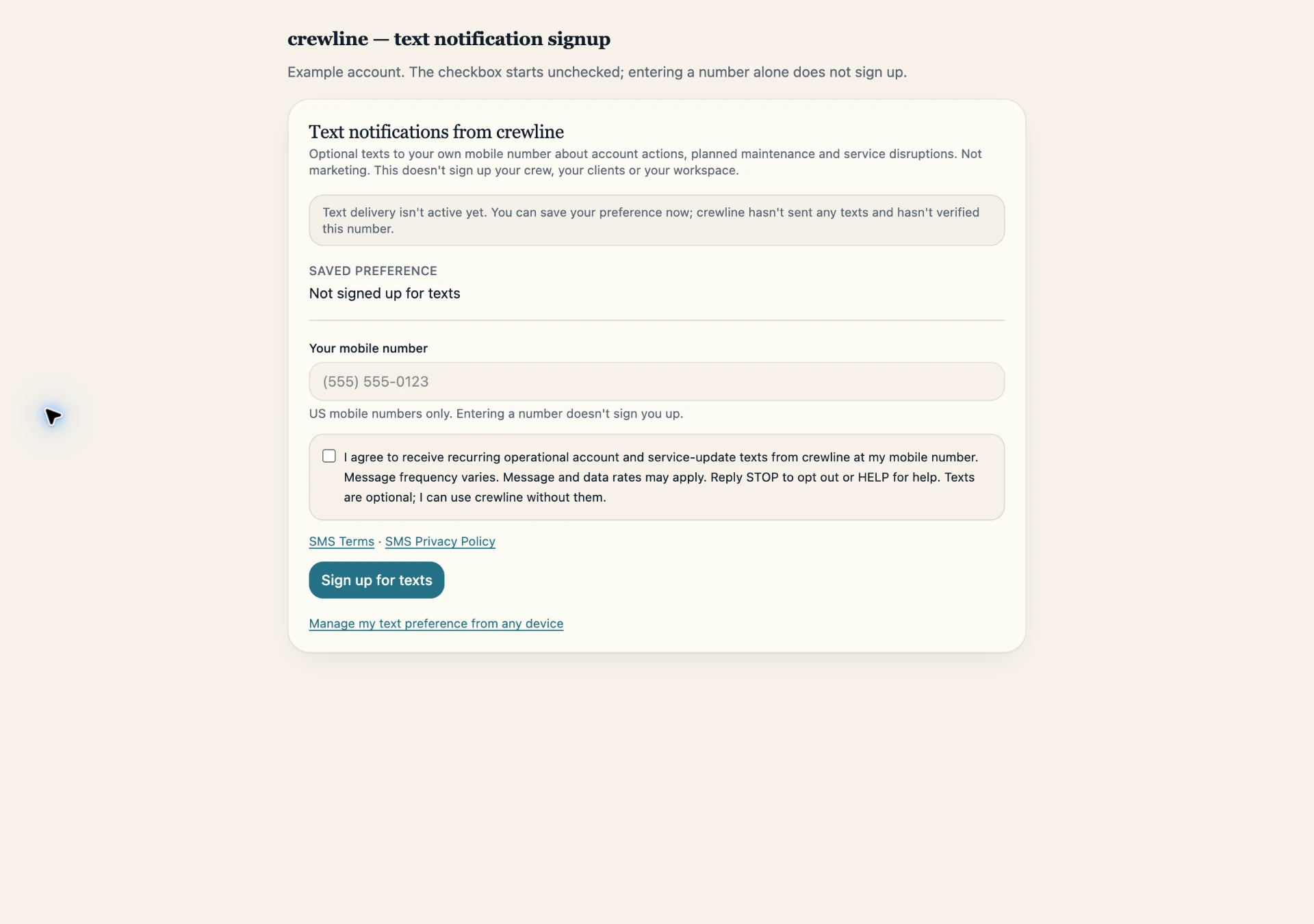
In the crewline app: Settings → My settings → "Text notifications from crewline". The screen explains that texts are optional and that text delivery is not active yet.
Steps
1. Enter your own US mobile number.
2. Tick the agreement box, which starts unticked. Its wording, shown directly beside the number:
"I agree to receive recurring operational account and service-update texts from crewline at my mobile number. Message frequency varies. Message and data rates may apply. Reply STOP to opt out or HELP for help. Texts are optional; I can use crewline without them."
Links to the SMS Terms (crewlineops.com/sms-terms) and SMS Privacy Policy (crewlineops.com/sms-privacy) appear directly under it.
3. Select "Sign up for texts". Only after our server saves the choice does the screen show "Saved" and your number as signed up.
Entering a number without ticking the box saves nothing. A different number needs the box ticked again. "Turn off texts" is available on the same screen, and on the personal text preference page at crewlineops.com/sms-preferences, which stays reachable after a subscription ends or a role changes.
What we record
Your account, the number, our server's time, the agreement version (sms-ops-v1) and the source (Settings → My settings). Opt-outs are recorded the same way, and earlier records are kept.
Messages
Account actions, planned maintenance and service-disruption updates only. No marketing. Frequency varies. Message and data rates may apply. Reply STOP to opt out, HELP for help. Support: support@crewlineops.com.
This is the actual crewline sign-up form shown with example account data. The agreement checkbox starts unchecked; entering a number alone does not sign up. View the full-size image.